
border-width
Utilities for controlling the width of an element’s borders.
| Class | Effect |
|---|---|
border |
border-width: 1px; |
border-<number> |
border-width: <number>px; |
border-[<value>] |
border-width: <value>; |
border-x |
border-inline-width: 1px; |
border-x-<number> |
border-inline-width: <number>px; |
border-x-[<value>] |
border-inline-width: <value>; |
border-y |
border-block-width: 1px; |
border-y-<number> |
border-block-width: <number>px; |
border-y-[<value>] |
border-block-width: <value>; |
border-s |
border-inline-start-width: 1px; |
border-s-<number> |
border-inline-start-width: <number>px; |
border-s-[<value>] |
border-inline-start-width: <value>; |
border-e |
border-inline-end-width: 1px; |
border-e-<number> |
border-inline-end-width: <number>px; |
border-e-[<value>] |
border-inline-end-width: <value>; |
border-bs |
border-block-start-width: 1px; |
border-bs-<number> |
border-block-start-width: <number>px; |
border-bs-[<value>] |
border-block-start-width: <value>; |
border-be |
border-block-end-width: 1px; |
border-be-<number> |
border-block-end-width: <number>px; |
border-be-[<value>] |
border-block-end-width: <value>; |
border-t |
border-top-width: 1px; |
border-t-<number> |
border-top-width: <number>px; |
border-t-[<value>] |
border-top-width: <value>; |
border-r |
border-right-width: 1px; |
border-r-<number> |
border-right-width: <number>px; |
border-r-[<value>] |
border-right-width: <value>; |
border-b |
border-bottom-width: 1px; |
border-b-<number> |
border-bottom-width: <number>px; |
border-b-[<value>] |
border-bottom-width: <value>; |
border-l |
border-left-width: 1px; |
border-l-<number> |
border-left-width: <number>px; |
border-l-[<value>] |
border-left-width: <value>; |
divide-x |
& > :not(:last-child) { border-inline-start-width: 0px; border-inline-end-width: 1px; } |
divide-x-<number> |
& > :not(:last-child) { border-inline-start-width: 0px; border-inline-end-width: <number>px; } |
divide-x-[<value>] |
& > :not(:last-child) { border-inline-start-width: 0px; border-inline-end-width: <value>; } |
divide-y |
& > :not(:last-child) { border-top-width: 0px; border-bottom-width: 1px; } |
divide-y-<number> |
& > :not(:last-child) { border-top-width: 0px; border-bottom-width: <number>px; } |
divide-y-[<value>] |
& > :not(:last-child) { border-top-width: 0px; border-bottom-width: <value>; } |
divide-x-reverse |
--tw-divide-x-reverse: 1; |
divide-y-reverse |
--tw-divide-y-reverse: 1; |
Examples
Section titled “Examples”Basic example
Section titled “Basic example”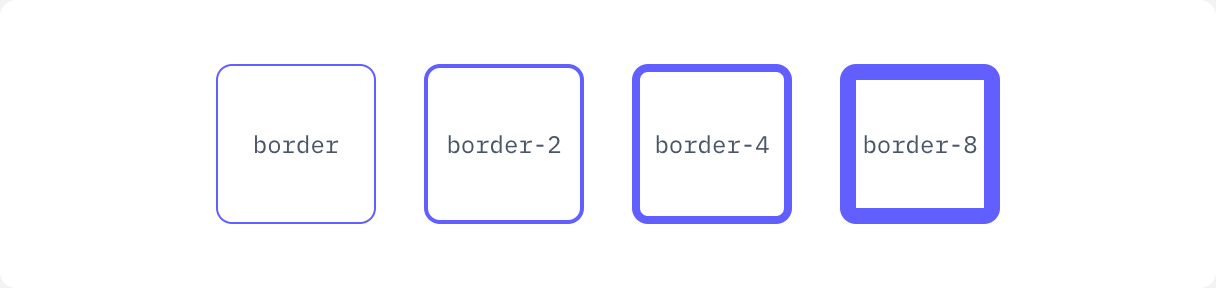

if ui.div("flex gap-6") { for c in ([]string{"border", "border-2", "border-4", "border-8"}) { ui.key(c) ui.text(c, ui.cx("flex size-20 items-center justify-center rounded-lg border-indigo-500 font-mono text-xs text-gray-600 dark:text-gray-300", c)) }}Individual sides
Section titled “Individual sides”

if ui.div("flex gap-6") { for c in ([]string{"border-t-4", "border-r-4", "border-b-4", "border-l-4"}) { ui.key(c) ui.el(ui.cx("size-20 rounded-lg border-indigo-500 bg-indigo-500/10", c)) }}Between children
Section titled “Between children”Use divide-x and divide-y on the parent.


if ui.div("grid w-full max-w-sm grid-cols-3 divide-x divide-gray-300 rounded-lg ring-1 ring-gray-300 dark:divide-white/15 dark:ring-white/15") { ui.text("01", "py-4 text-center font-mono text-sm text-gray-700 dark:text-gray-300") ui.text("02", "py-4 text-center font-mono text-sm text-gray-700 dark:text-gray-300") ui.text("03", "py-4 text-center font-mono text-sm text-gray-700 dark:text-gray-300")}